0 items
in your cart
Check Out!

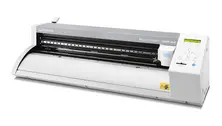
Ioline™ 300 Flatbed Cutter

Ioline™ 300 Flatbed Cutter

Image Gallery

The comprehensive design, cut, and sew system.

Gain complete control over your appliqué cutting. Instantly produce custom logos, team names, numbers, or decorative designs in-house. Ioline's exclusive 301 software drives the cutter and allows you to automatically create embroidery sew disks.

Qty:
Add To Cart >
Please wait... Adding to Cart
Live Support ONLINE CHAT NOW!

Need Help?
Our live support is available for you, Mon-Fri 8AM-7PM EST
or call
800.4.STAHLS (800.478.2457)

Technical Specifications

Features

  • Made in the USA - a powerful workhorse that’s built to last!
  • Simple to use - interfaces with a PC just like a printer.
  • Create sew disks with the 301 software.
  • Cut up to 400 pieces per hour
  • Cuts Poly-TWILL™, felt, vinyl, CAD-CUT® materials, and more!

Manuals:

Ioline 300 Quick Start Guide

Ioline 300 System User Guide

300 System Includes:

  • Ioline 301 software
  • User guide
  • Adhesive sheets (3-pack)
  • Quick start guide
  • (2) sheets of backing material - (1 single sided, 1 double sided)
  • (2) 45º blades

Ioline Exclusive 301 Software: Software allows you to create embroidery applique sew files for your cut pieces.

Output a .dst, .exp, .toy, or .dat format disk that includes the placement stitch and zig-zag or satin stitch (w/ tack down).

Download the Ioline 301 Software User Guide here.

Questions & Answers

Everyone has questions. Tell us yours.

Q:
If I purchase the Ioline flatbed cutter from Stahls' can I also get the Mega Greek font for foreground and background?
A:
If you'd like to cut your own Greek letters with the Ioline 300, CadWorxLive has a similar Greek font. The major difference is that Stahls' Mega Greek is sized 4" x 4". CadWorxLive will enable you to change the letter height and width. You can also search font websites for Roman and Greek fonts to use within your own graphics program.
Q:
My cut tray is not moving for my Ioline 300. Do I need a repair?
A:
Check to see if the small drive belt needs to be replaced.
Q:
What caused my material to bunch while cutting?
A:
On a flatbed cutter, this may be caused by your adhesive sheets losing tackiness. Adhesive sheets should be replaced.
Q:
My cutter won’t cut after the job was sent from my computer. What could be the problem?
A:
Check to see that your cables are securely connected from the computer to the cutter. If that doesn't work, consult your owner's manual.

Ask a question

Leave us a question and we'll post the answer shortly. If you need an immediate response, please use live chat.

1. Contact Information:

Name
Company
Email

2. Question Category:

3. Enter Question:

SUBMIT >RESET
Want to learn more?
Visit our Blog.
GO >

Review this product.

1. Contact Information:

Name
Company
Email

2. Rate this item:

3. Title for your review:

4. Write your review:

SUBMIT >RESET